Product completeness score and rules
Introduction
Every product in Centra gets a completeness score from 0% to 100%: the share of its required data that is filled in. A completeness rule decides which fields are required. The score shows what a product still needs, so you catch gaps before launch. It works out of the box: the Default rule applies to every product until you change it.
- Presence, not quality. A field passes when it is filled. Centra does not judge the value.
- Never a blocker. Missing data never stops you from saving a product or making it active.
- Scored on the product. Variants, stores and displays all feed into one product score. Displays are not scored separately, since they are often added later.
You need the Catalog permission to see and manage completeness rules.
Find and fix incomplete products
Product listing
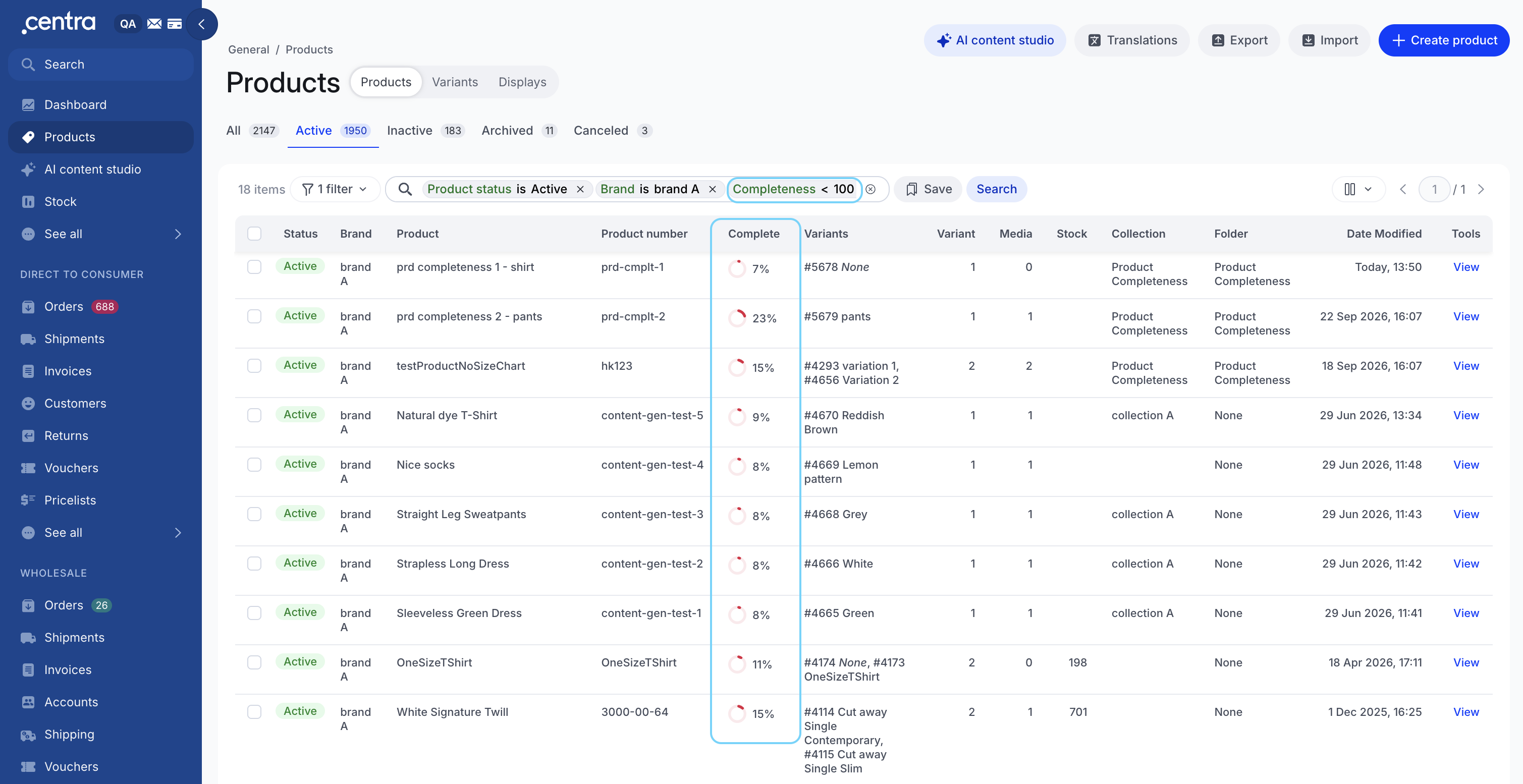
Go to Products. The Complete column shows each product's score as a ring and a percentage: red when low, yellow in progress, green at 100%. A greyed, spinning ring means the score is being recalculated. Archived and cancelled products show a dash.
Use the Completeness status filter to find complete or incomplete products. Per-language columns such as EN complete can be added from the column picker.
Product details
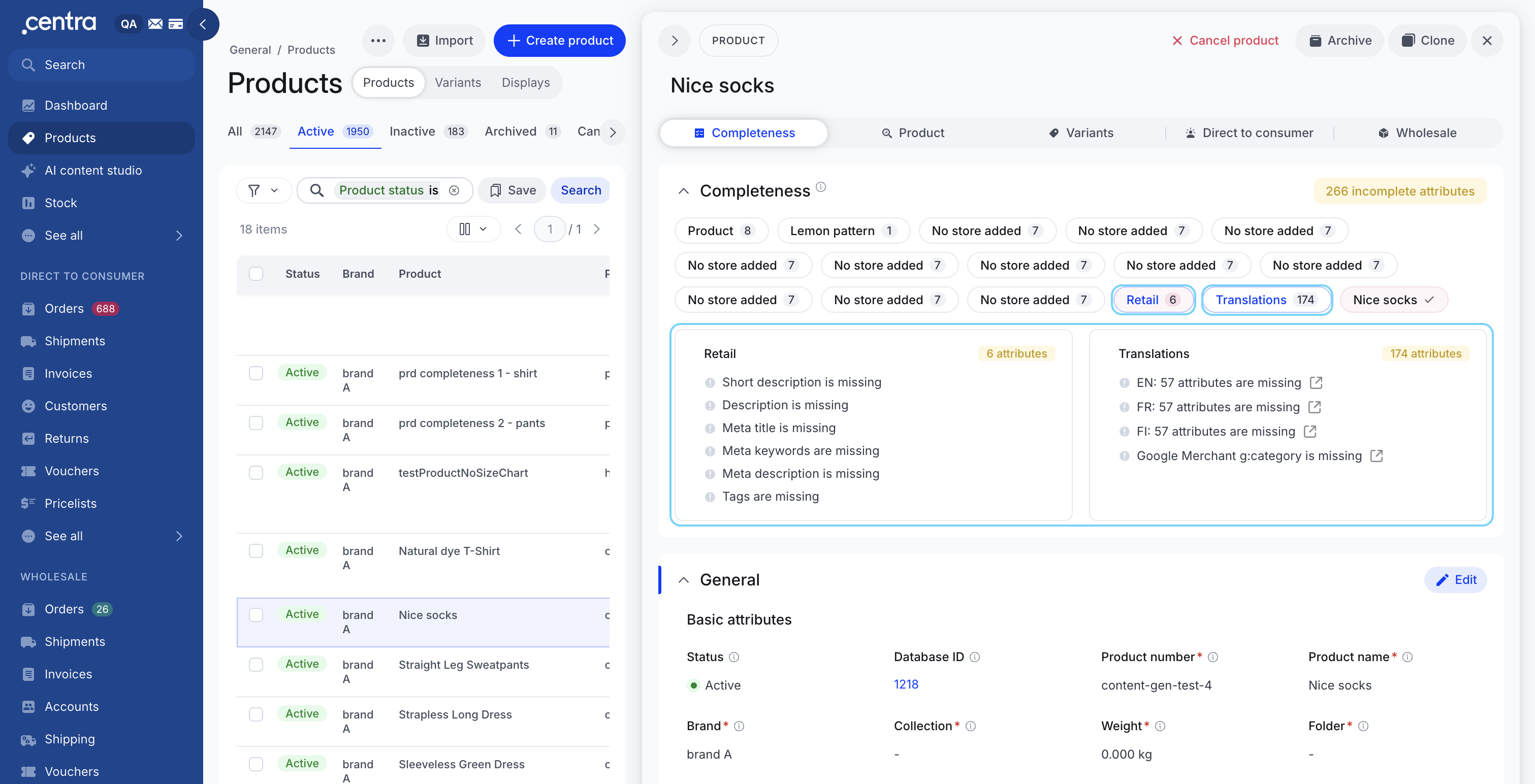
Open a product. The Completeness section sits at the top of the panel, with a summary such as 4 live gates, 34 incomplete attributes.
- Below the summary, each item in the product has a pill with its issue count: Product, each variant (for example #01 Red), each store (for example DTC Store), each display and Translations. Incomplete pills come first.
- Click a pill to open its card. The card lists every missing field and live gate, for example Collection is missing or Variant status is not active. Size issues appear under their variant, for example S: EAN is missing.
- Click a missing field to jump straight to it in the form, fill it in and save.
Fields the product's rule requires are marked with a red asterisk (*) everywhere they appear, in both view and edit mode.
Complete vs active
Complete is not the same as active. Complete means everything required is in place and the product is ready to sell. Active means its statuses are switched on. Whether it can actually be bought also depends on connected setup that completeness does not evaluate, such as a market's countries or a delivery window's dates. A product can read 100% and still be switched off; that is a choice, not a gap.
Live gates are the status switches for the product, its variants and its displays. They must be on for an item to be active. The Completeness section shows what is missing for the product to be considered complete, and lists inactive statuses alongside, but live gates never lower the score.
Translations
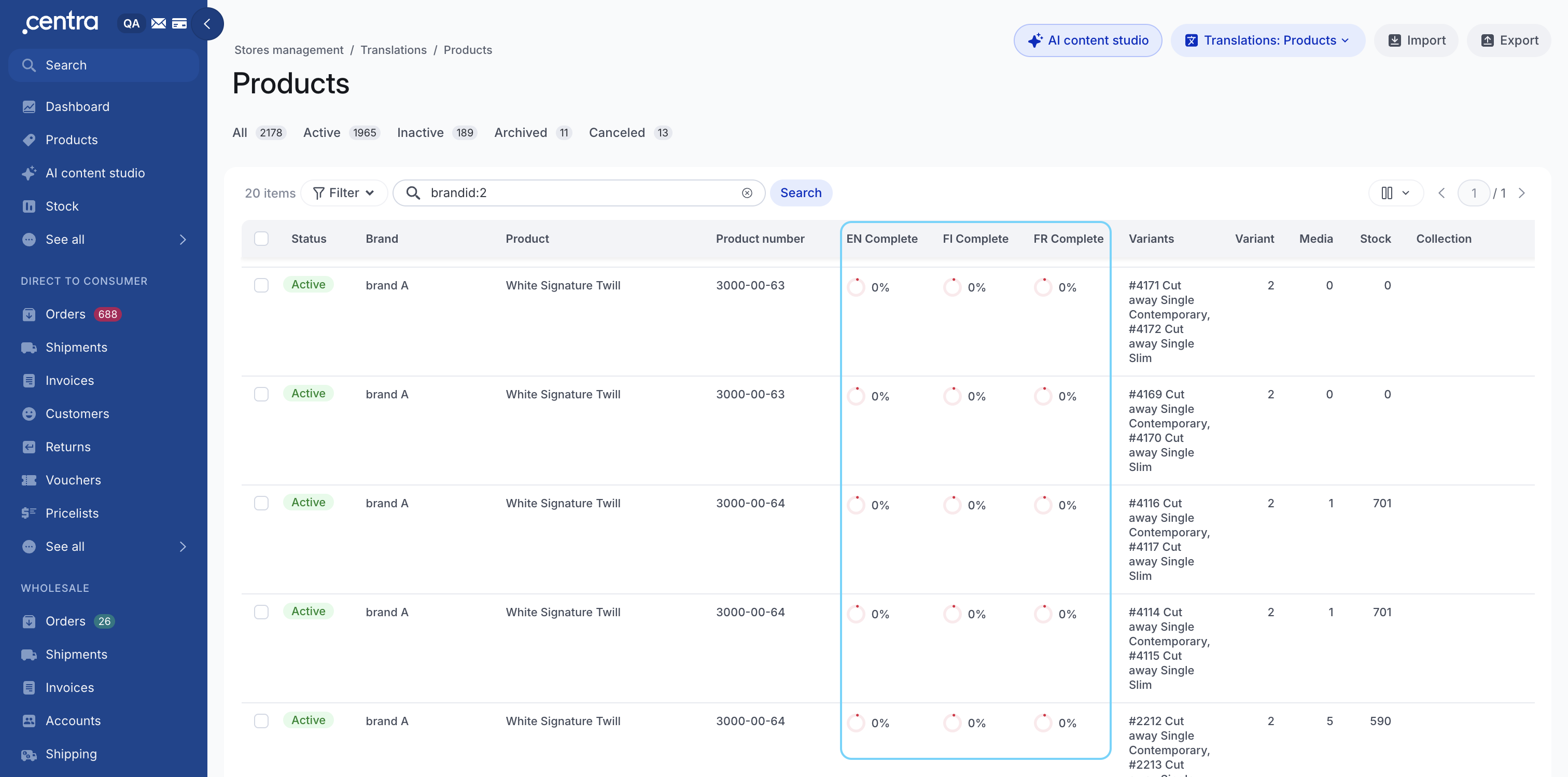
Go to Store management → Translations → Products. Each required language has its own column, for example PL complete and EN complete.
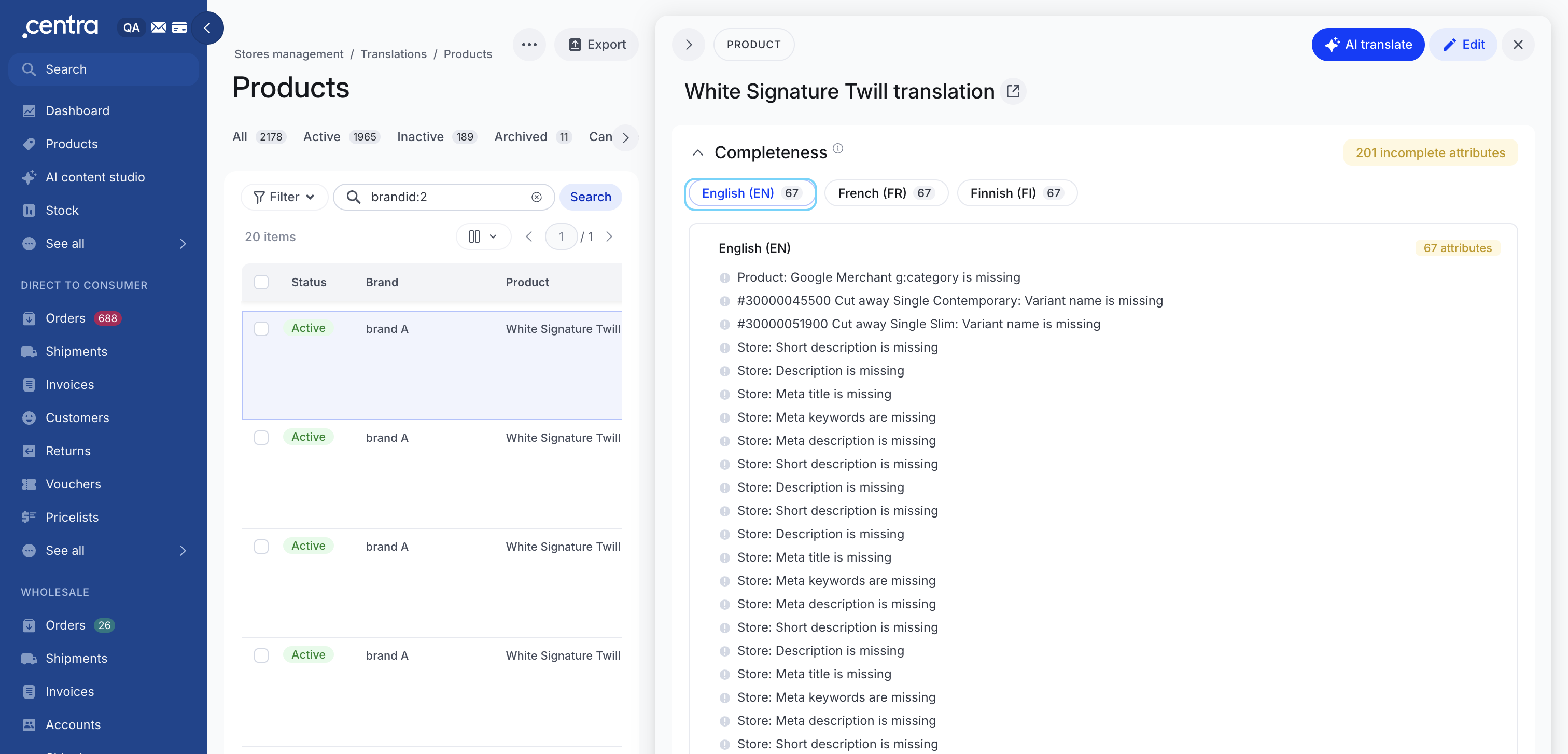
Open a product to see its translation completeness, with one pill per required language plus Mapped attributes. Mapped attribute links open the attribute in a new tab. From here you can translate both product data and mapped attributes, by hand or with AI translate.
Understanding your score
Every product needs a complete webshop visibility chain: at least one variant, one size with a stock value, one store, one display, one market and one price. If any link in the chain is missing, the product is incomplete. A product that is not in any store counts as missing one, so it can never reach 100%.
The score is the share of required checks that pass. Live gates and Optional checks are left out.
Only active and inactive products are evaluated. Within each product, checks are counted once for every item in play:
| Level | Counted | Not counted |
|---|---|---|
| Product | Once | Cancelled and archived products |
| Variant | Once per variant | Cancelled variants |
| Size | Once per activated size, under its variant | Non-activated sizes |
| Store | Once per store the product is in | None |
| Display | Once per display | Cancelled displays |
| Translations | Once per required language, for each field marked for translation | Non-required languages |
Worked example. A product has 3 variants, 2 stores and 6 displays, with 5 required checks on each level. It has 5 + (3 × 5) + (2 × 5) + (6 × 5) = 60 checks to pass. If 45 pass, the score is 75%.
What counts as passing:
- One market and one price are enough. Each display needs a market and each store a price. Wider coverage is reviewed on the Catalog health dashboard, not scored.
- 0 is a valid value for stock and price. Blank is not.
- Assignment only. Centra checks that a market or delivery window is assigned, not its countries or dates.
- Delivery windows are checked per wholesale display: at least one of the display's activated variants must be in a delivery window.
- Translations are checked only for your required languages, on fields where your rule requires a translation. Each language also has its own score, shown in columns such as EN complete.
Choose what's required: completeness rules
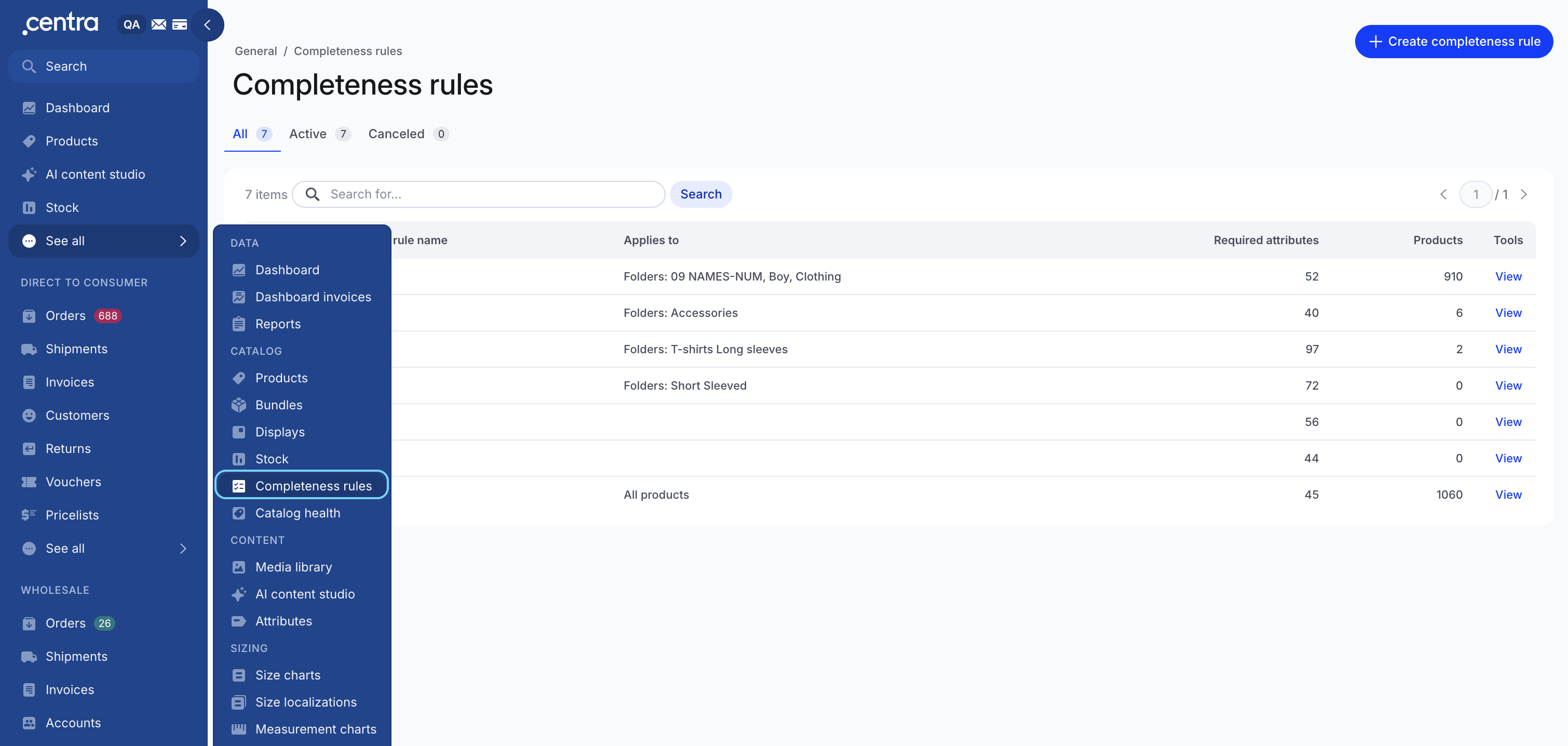
Go to General → See all → Completeness rules.
How rules work: one default, with folder overrides
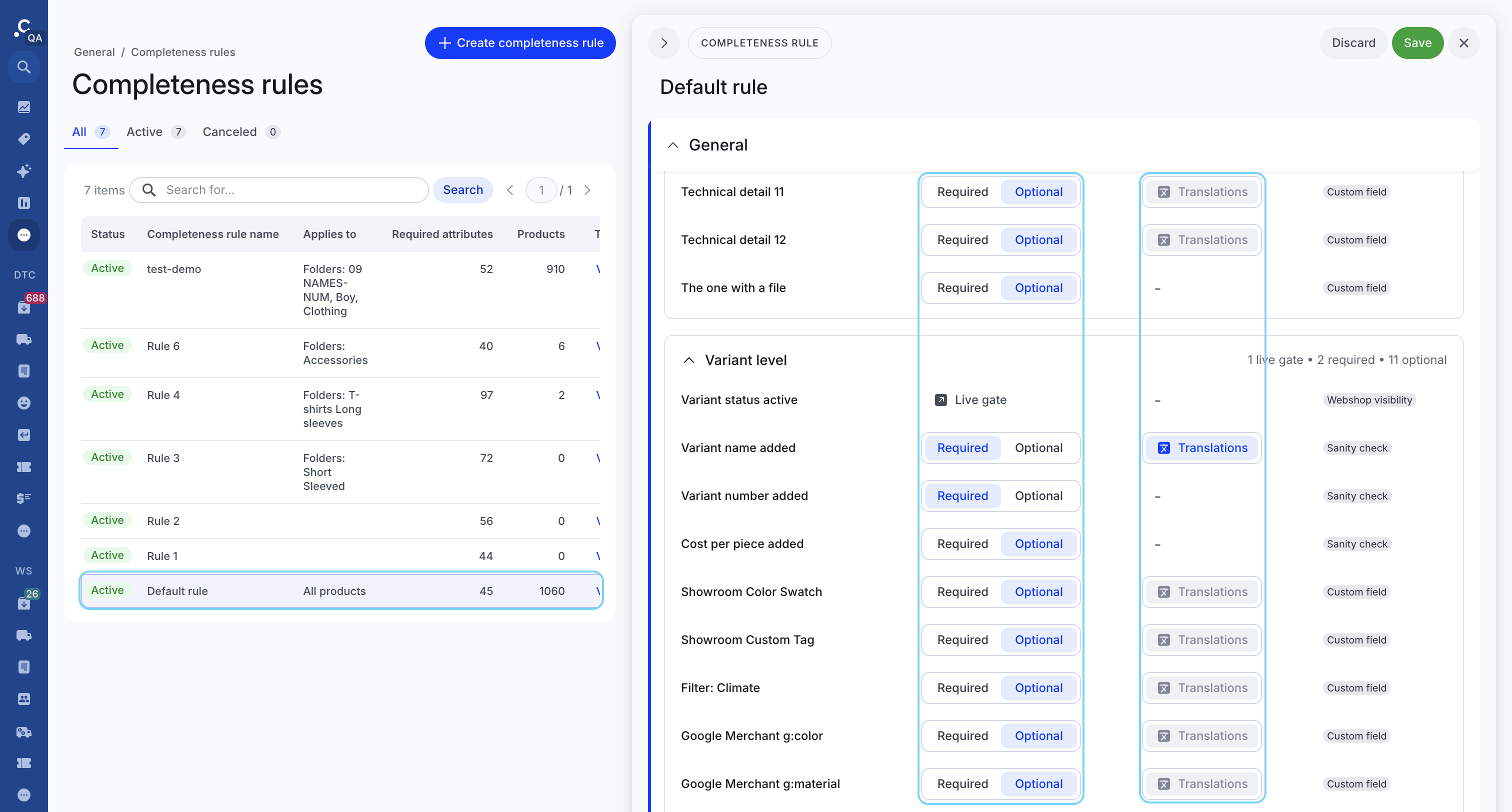
The Default rule is always on and applies to all products. To set different requirements for some products, add a folder override. Products in its folders use the override; all other products keep the Default rule.
- An override replaces the Default rule for its products rather than adding to it, so set every check they need.
-
Each folder can belong to only one override.
Check tags
Every check in a rule carries one of three tags:
| Tag | Setting | Counts toward the score |
|---|---|---|
| Webshop visibility | Live gate or Required, locked | Required checks yes, live gates never |
| Sanity check | Required by default, can be set to Optional | When Required |
| Custom field | Optional by default, can be set to Required | When Required |
Webshop visibility checks are the minimum Centra needs to show a product on the webshop or in Showroom. Sanity checks cover data a product should have even though it can show without it, such as EAN, weight and SEO texts. Custom fields are your own attributes and other optional fields.
Required does not mean blocking. Setting a check to Required only affects the completeness score. It does not stop you from saving, activating or selling a product, and Centra's existing validation stays as it is.
Step 1: Adjust the Default rule
- Go to Completeness rules and open Default rule.
- Under Rules, go through each level and set each check to Required or Optional to match what your whole catalog needs. Webshop visibility checks are locked and always required.
- For translatable fields set to Required, switch on Translations to also require the field in every required language. Optional fields cannot require translations.
- In Translations level, set the languages you are launching in to Required.
- Click Save to apply your changes, or Discard to undo any unsaved edits.
You cannot rename, cancel or delete the Default rule, or assign folders to it. Reset restores Centra's defaults.
Step 2: Add a folder override (optional)
Add an override when some product types need different fields. For example, an Accessories folder may not need a measurement chart, while Footwear needs dimensions per size.
- On the Completeness rules page, create a new rule. To start from your current setup instead, open the Default rule and click Clone.
- Enter a Completeness rule name and set the Status to Active.
- In Applies to folders, pick the folders this override covers. Folders already used by another override are marked with an asterisk (*). If you pick one, a confirmation lists the folders that will move and the rules they move from.
- Under Rules, set each check to Required or Optional for these products.
- Set Translations on fields and required languages in Translations level, as for the Default rule.
- Click Save. Products in those folders are scored against the override from the next recalculation.
To stop using an override, cancel it. Its products go back to the Default rule.
Rule actions and history
| Action | What happens |
|---|---|
| Reset | Restores the default checks and clears the rule's languages. Custom changes are lost. |
| Clone | Creates a new rule with the same checks and languages. Enter a new name and, optionally, folders; folders are not copied, so no folder ends up in two rules. |
| Cancel | Sets the rule to Cancelled. Its products fall back to the Default rule. You can set it back to Active later. |
| Delete | Cancel a rule that is already cancelled to delete it permanently. |
The History table at the bottom of each rule logs who changed it and when.
When scores update
- Daily. The whole catalog is re-evaluated every day at 21:00.
- Single product edits in AMS recalculate that product straight away, and its Completeness section refreshes.
- Bulk edits, imports and API updates are queued and recalculated shortly after. Adding a translation to a mapped attribute counts as a bulk change.
- New products are evaluated when they are created, whether in AMS, by import or through an API.
- Recalculate button. When a product's score is out of date, a Recalculate button appears in its Completeness section. It recalculates every score for that product, including translations.
Reference: all checks
Store and display checks are set separately for Direct to consumer and Wholesale. Live gates are shown in the Completeness section but never scored.
| Level | Always required (locked) | Required by default | Optional by default |
|---|---|---|---|
| Product | Name. Live gate: product status | Brand, product number, collection, weight, folder, harm code, harm code description, country of origin, measurement chart | Custom attributes |
| Variant | At least one variant that is not cancelled. Live gate: variant status | Variant number, variant name | Cost per piece, custom attributes |
| Size | Stock value set. This activates the size: 0 is valid, only an empty value fails. It is not a low-stock check. | EAN | UPC, size number, comment, dimensions, weight per size |
| Store | Price in at least one pricelist. 0 is a valid price. | Short description, description, meta title, meta keywords, meta description, tags | — |
| Display – Direct to consumer | Display exists for the store, display name, URI, at least one market, at least one category, at least one activated variant. Live gate: display status | Media activated (at least one) | Custom attributes, relations |
| Display – Wholesale | As Direct to consumer, plus at least one activated variant assigned to a delivery window | Media activated (at least one) | Minimum order amount, order denominator, custom attributes, relations |
| Translations | — | — | Each language. Set the languages you launch in to Required. |
Every store the product is in needs at least one display. If a store has none, the score counts it as one missing display. For markets and delivery windows, Centra only checks that one is assigned to each display, not its countries or dates.
Limitations and FAQ
What completeness does not do
- It does not check whether values are correct or well written.
- It does not record who changed product data.
- It does not vary requirements by market. Presence is still checked per display and market, but whether a field is required is the same for the whole rule.
- It does not yet cover bundles, and the score is not yet available in the Integration API.
FAQ
My product is at 100% but not on the webshop. Why? Either a live gate is off, or related setup is misconfigured. A live gate is off when the product, a variant or a display is inactive. Check the Completeness section for live gates. Related setup is not evaluated by completeness, so check it directly, for example whether the brand is activated in the store.
My product isn't sold in every country. Is it incomplete? No. One market per display and one price per store are enough. Review wider coverage under Coverage to review on the Catalog health dashboard.
I changed a rule but scores did not move. Scores update at the next recalculation. Use Recalculate on the product or the Catalog health dashboard to refresh sooner.
A field shows a red asterisk. Do I have to fill it before saving? No. The asterisk means the product's rule requires it for completeness; you can still save without it.